For U.S. and Canadian book projects
Book printing that arrives with a plan.
Get clear production pricing, guided proofing, and air or ocean delivery options for larger book runs, catalogs, manuals, and custom publishing projects.
Why Printsquare
Built for print runs that need more than a checkout button.
Bulk pricing that changes the math
For larger book runs, overseas production can reduce unit cost while keeping quote details visible before you commit.
Proofing that protects the final run
Use file guides, E-Proof, and Digital-Proof options to catch layout issues before they become printed issues.
Delivery strategy, not just shipping speed
Rush a deadline, lower freight cost, or split shipments by choosing air, ocean, split delivery, or direct mailing.
Human review for nonstandard books
If your book does not fit the calculator, it can still fit the workflow through a custom quote request.
Project fit
Built for more than one kind of publisher.
Pricing reference
Bulk pricing that changes the math.
Printsquare is strongest when your project needs more than a one-off copy. Compare practical quantities, then move into an instant quote with production cost visible early. This sample comparison uses standard currency: USD.
- Perfect Binding, 8.5 x 11"
- Gloss 250gsm cover, Gloss 110gsm inside
- 100 pages, full color
| Quantity | Company 'P' | PRINTSQUARE | Company 'L' |
|---|---|---|---|
| 1,000 copies | $8,201$8.2 / copy | $3,050$3.05 / copy | $6,061$6.06 / copy |
| 5,000 copies | $39,645$7.93 / copy | $7,220$1.44 / copy | $30,303$6.06 / copy |
| 10,000 copies | $75,000$7.5 / copy | $12,460$1.25 / copy | $57,000$5.7 / copy |
| 50,000 copies | $360,000$7.2 / copy | $58,730$1.17 / copy | $285,000$5.7 / copy |
| 100,000 copies | $710,000$7.1 / copy | $116,010$1.16 / copy | $570,000$5.7 / copy |
For mass-copy orders, ocean shipping and split delivery can help reduce delivery cost while keeping a delivery plan attached to the print quote.

Paper, proof, and samples
Choose how much certainty you need before the press runs.
Paper quality
Make the book feel like the project you imagined.
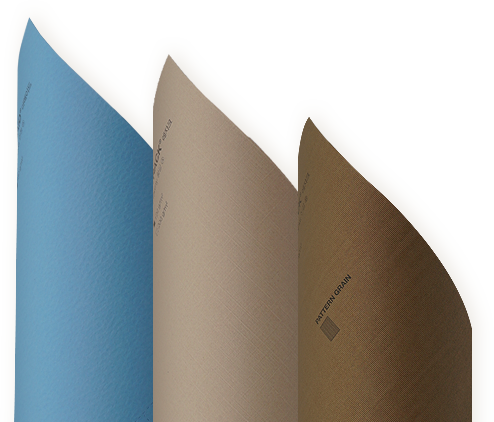
Printsquare offers 19 different paper materials across thicknesses, textures, and colors. Choose the paper that fits the purpose of your book, from lightweight catalogs to premium editions.
When texture and finish matter, review the paper guide or request samples before placing a larger order.
Delivery planning
Pick the delivery strategy, not just the shipping speed.
For U.S. and Canadian customers, shipping is often the real question. Printsquare lets you compare faster delivery, lower freight cost, and split shipment options after the print quote is clear.
Recent work
See what bulk book printing can look like.
Order process
Every order moves through a visible production path.
-
01
Quote Check
Confirm binding, size, paper, quantity, and delivery direction before you move forward.
-
02
Order
Place the order once the production plan and major specifications are clear.
-
03
File Upload
Upload cover, inside pages, and any special finishing files needed for review.
-
04
Proof Check
Review E-Proof or Digital-Proof before production starts.
-
05
Payment
Complete payment after the order details are ready.
-
06
Print
Production begins after proof confirmation.
-
07
Shipping
Move by air, ocean, split delivery, or direct mailing depending on the project.
-
08
Customer Service
Get support through delivery and after arrival.
Managed handoff
Each step reduces uncertainty before the next one begins.
Instead of treating printing as a black box, the process separates quote, files, proof, payment, production, and delivery so customers know what has been checked and what comes next.
Guides and tools
Prepare files with fewer expensive surprises.
Printsquare blog
Print planning, without the guesswork.
Recent guides on paper, binding, proofing, shipping, and file setup.
[Notice] Guidelines for PDF Export & Color Profile Settings
To ensure color accuracy, PrintSquare uses U.S. Web Coated (SWOP) v2 as our standard profile. Please follow these steps before exporting your PDF.1. Adobe InDesignColor Settings: Edit > Color Settings > Set CMYK to [U.S. Web Coated (SWOP) v2].Export PDF: File > Export > Select [Adobe PDF (Print)].Output Tab:Color Conversion: [Convert to Destination (Preserve Numbers)]Destination: [U.S. Web Coated (SWOP) v2]Policy: [Include Destination Profile]2. QuarkXPressExport Menu: File > Export > Layout as PDF > Click [Options].Color Tab:Mode: [Composite] / Setup: [CMYK]Source Setup: Select [U.S. Web Coated (SWOP) v2].Final Step: Check [Include Profile], click OK and save your PDF.3. Quick CheckCMYK Only: Ensure all RGB images are converted to SWOP v2.Black Text: Use K100 (C0 M0 Y0 K100) for small text.Bleed: Include a 3mm (0.125") bleed on all sides.PrintSquare
[Update] Notice on Delivery and Tariffs
At PrintSquare, all shipments are handled on a door-to-door basis unless customers specifically request a different delivery option. This ensures that your order will arrive directly at the address you provide, without additional arrangements needed on your side.Regarding tariffs and import duties, please note that printed materials such as booklets, magazines, catalogs, manuals, and other bound publications fall under HTS code 4911.10. Items in this category are duty-free worldwide, as printed matter is considered essential for the free flow of information. This means that no additional customs duties or import charges should be imposed upon delivery.Should there be any changes to international tariff policies in the future, we will inform our customers immediately to ensure full transparency and to avoid unexpected costs.PrintSquare
